The Problem I Was Trying to Solve
I've been running a homelab on Proxmox and like most homelab enthusiasts, I wanted reliable power backup. Living in an area with frequent blackouts, I needed something that could keep my critical services running without breaking the bank.
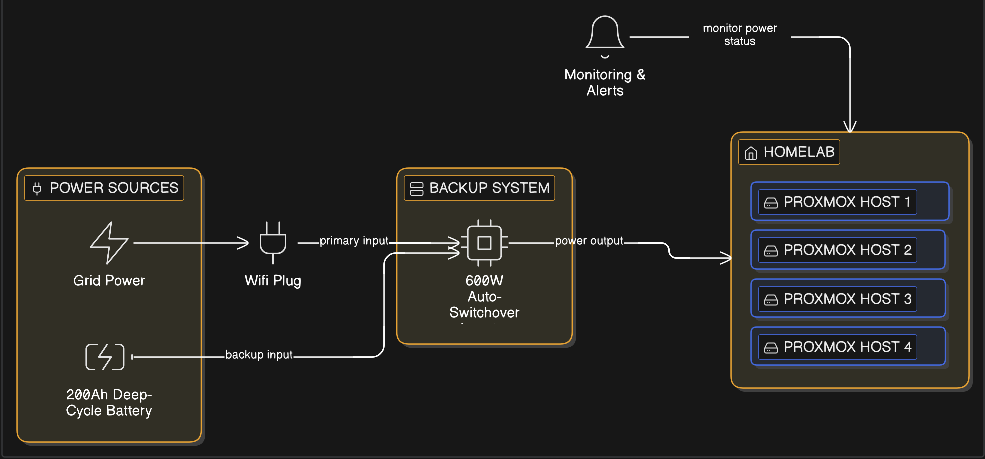
At the beginning 2025, I set up a basic power backup system: a 200Ah deep-cycle battery paired with an 850VA(about 600 watts) auto-switchover inverter. It's not fancy and I'm not even sure what the exact switching time is, but it's worked reliably. My goal was to keep the lab running for at least 8 hours during a blackout.
Here's the thing though; I don't have a traditional UPS with network monitoring capabilities. No fancy APC Smart-UPS with USB or network interfaces. Just a basic inverter doing its job.
The Manual Workaround
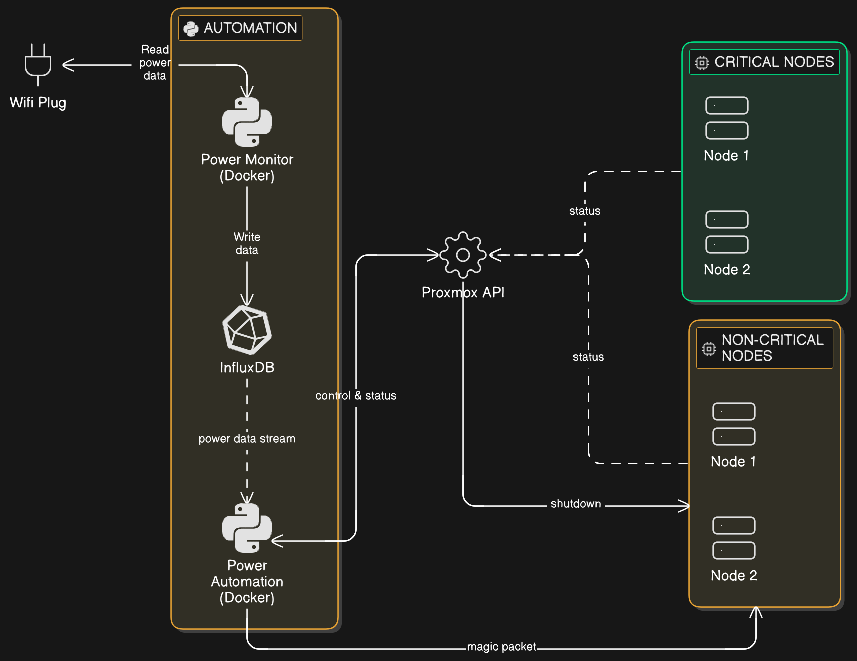
My homelab runs on four Proxmox nodes. Two of them host non-critical VMs; things like my testing environments, media servers, and development containers. The other two nodes run the stuff I actually care about during a power outage: my network services, DNS, and a few always-on applications.
To maximize battery runtime, I'd been manually shutting down the two non-critical nodes whenever power went out. Then, once mains power returned, I'd physically push the power buttons on the two nodes. This worked, but it was tedious. And if I wasn't home when the blackout happened? Those nodes would just keep draining the battery.
I wanted to automate this process.
Monitoring Power: The Wi-Fi Plug Hack
Since my inverter doesn't have any communication interface, I had to get creative. I already had a smart Wi-Fi plug (one of those cheap ones that monitor power consumption) plugged into my lab's socket. This plug sends real-time power metrics(current, voltage, and wattage) to InfluxDB every few seconds, through another automation.
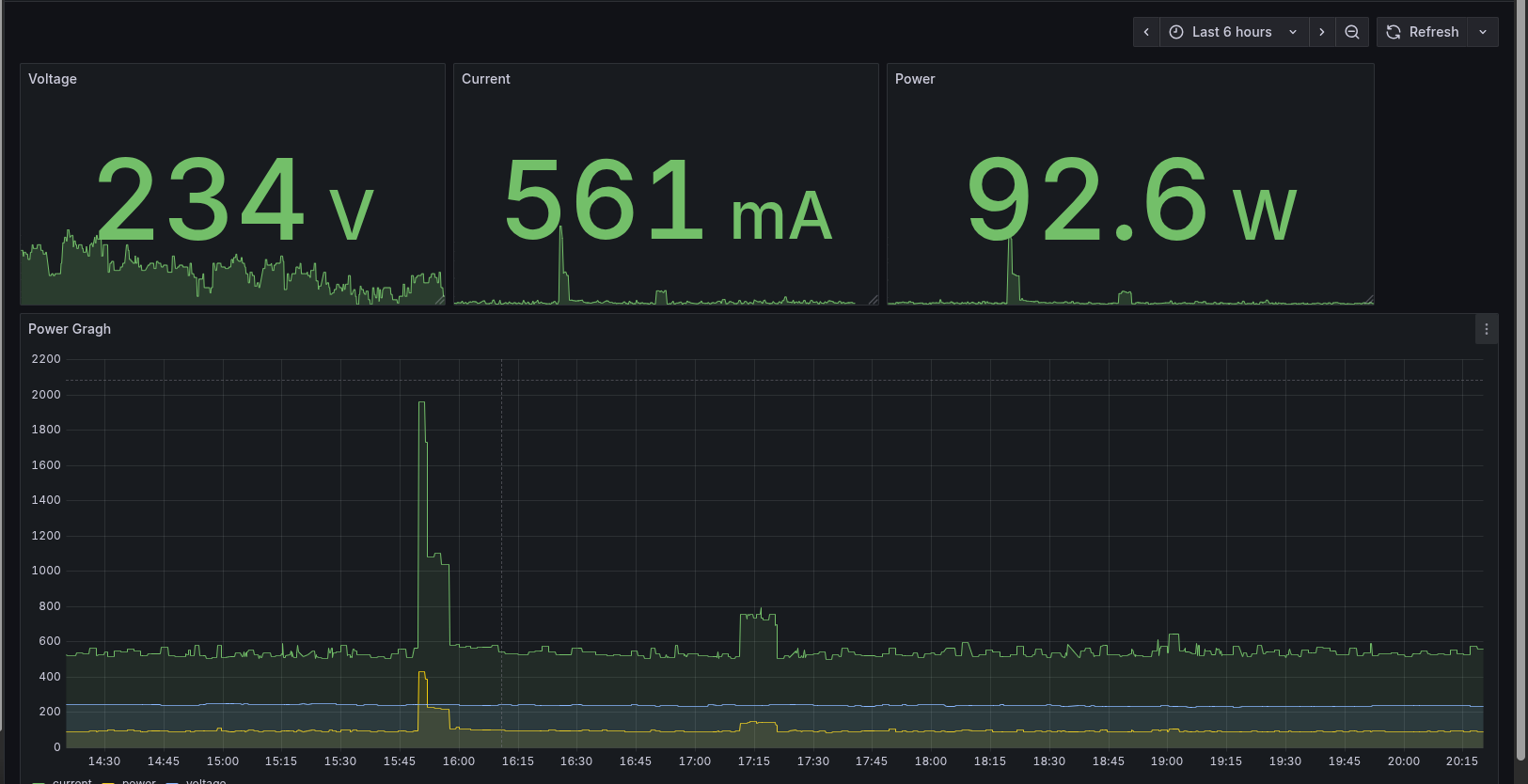
The insight I had was simple: when there's a blackout, the plug stops sending data. So instead of trying to detect "low battery" or "power failure" signals (which my inverter doesn't provide), I could just watch for when the data stream goes stale.
Here's the Flux query I use in Grafana to visualize the power data:
from(bucket: "power-usage")
  |> range(start: v.timeRangeStart, stop: v.timeRangeStop)
  |> filter(fn: (r) => r["_measurement"] == "power_status")
  |> filter(fn: (r) => r["_field"] == "current" or r["_field"] == "power" or r["_field"] == "voltage")
  |> aggregateWindow(every: v.windowPeriod, fn: mean, createEmpty: false)
  |> yield(name: "mean")
If the last datapoint is more than, say, 60 seconds old, I can assume the power is out.
Designing the Automation
I needed a system that could:
- Monitor the InfluxDB data stream for staleness
- Gracefully shutdown non-critical Proxmox nodes when a blackout is detected
- Wait for power stability before attempting to wake the nodes back up
- Continuously verify that nodes are in the expected state (up or down)
- Run in Docker so I could deploy it easily
Setting Up Proxmox for Remote Power Management
Wake-on-LAN Configuration
For the power-on automation to work, I needed to configure Wake-on-LAN on each Proxmox node. I handled this through BIOS settings on each node:
BIOS/UEFI settings (these vary by motherboard, but generally):
- Enable "Wake on LAN"
- Enable "Power on by PCI-E"
- Disable "ErP Mode" or "Deep Sleep" (these kill standby power to the NIC)
I also recorded the MAC address of each node's primary network interface — I'd need these for the WoL packets later.
Creating a Proxmox API Token
For the automated shutdown, I needed to use the Proxmox API. SSH with keys would have worked, but the API is cleaner and more "proper" for automation.
Here' the setup order I used to setup the API token with the correct permissions:
1. Create a group:
Datacenter → Permissions → Groups → Create
- Group name:
power-mgmt-group
2. Create a user and assign it to the group:
Datacenter → Permissions → Users → Add
- User:
powerbot@pve - Realm:
pve - Group:
power-mgmt-group
3. Create a role with the required privileges:
Datacenter → Permissions → Roles → Create
- Role name:
PowerMgmt - Privileges:
Sys.PowerMgmt(allows shutdown/reboot of nodes)Sys.Audit(allows reading node status)
4. Assign the role to the group:
Datacenter → Permissions → Add → Group Permission
- Path:
/(for all nodes) or/nodes/<nodename>(for specific nodes) - Group:
power-mgmt-group - Role:
PowerMgmt
5. Create the API token:
Datacenter → Permissions → API Tokens → Add
- User:
powerbot@pve - Token ID:
powerctl - Privilege Separation: Enabled (recommended)
Save the token value immediately — you won't see it again.
6. Assign the role to the API token:
Datacenter → Permissions → Add → API Token Permission
- Path:
/or/nodes/<nodename> - API Token:
powerbot@pve!powerctl - Role:
PowerMgmt
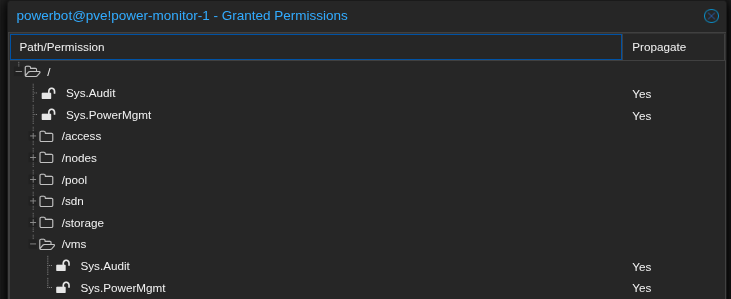
Without step 4 (assigning the role to the group), the API token will fail even if step 6 is done correctly.
The Python Script: A Deep Dive
I wrote a Python script that runs in a Docker container and handles all the logic. The script continuously monitors power status and manages node states based on what it finds. Let me walk you through how it works.
Setting Up the Foundation
First, the necessary libraries and set up configuration:
import os
import time
import logging
import requests
from influxdb_client import InfluxDBClient
from proxmoxer import ProxmoxAPI
from wakeonlan import send_magic_packet
from dotenv import load_dotenv

load_dotenv()

# Set up logging so we can see what's happening
logging.basicConfig(level=logging.INFO, format='%(asctime)s - %(levelname)s - %(message)s')
The imports are straightforward:
influxdb_clientfor querying power dataproxmoxerfor communicating with the Proxmox APIwakeonlanfor sending magic packets to wake sleeping nodesdotenvfor loading environment variables from a.envfile (useful for local testing)- Standard libraries for everything else
Configuration from Environment Variables
Rather than hardcoding values, I pull all configuration from environment variables. This makes the Docker container configurable without rebuilding:
# InfluxDB connection details
INFLUX_URL = os.getenv("INFLUX_URL", "http://influxdb:8086")
INFLUX_TOKEN = os.getenv("INFLUX_TOKEN")
INFLUX_ORG = os.getenv("INFLUX_ORG")
INFLUX_BUCKET = os.getenv("INFLUX_BUCKET", "power-usage")

# Proxmox API credentials
PVE_HOST = os.getenv("PVE_HOST")
PVE_USER = os.getenv("PVE_USER")
PVE_TOKEN_NAME = os.getenv("PVE_TOKEN_NAME")
PVE_TOKEN_VALUE = os.getenv("PVE_TOKEN_VALUE")

# Timing configuration
SHUTDOWN_GRACE_PERIOD = int(os.getenv("SHUTDOWN_GRACE", "60"))  # 60 seconds
STARTUP_GRACE_PERIOD = int(os.getenv("STARTUP_GRACE", "300"))   # 5 minutes
CHECK_INTERVAL = int(os.getenv("CHECK_INTERVAL", "30"))         # 30 seconds
The grace periods are important:
- SHUTDOWN_GRACE: How long to wait after the last power data before assuming a blackout (60 seconds by default)
- STARTUP_GRACE: How long power must be stable before waking nodes (5 minutes by default to avoid power flickers)
- CHECK_INTERVAL: How often to run the monitoring loop (30 seconds)
Parsing Node Configuration
The nodes are configured as a comma-separated string in the format name|mac|ip. I parse this into a list of dictionaries:
# Parse nodes: format is "name|mac|ip,name|mac|ip,..."
NODES_RAW = os.getenv("TARGET_NODES", "").split(",")

nodes = []
for n in NODES_RAW:
    name, mac, ip = n.split("|")
    nodes.append({
        "name": name,
        "mac": mac,
        "ip": ip,
        "actual_state": "UNKNOWN"
    })
Each node dictionary tracks:
- name: The Proxmox node name (e.g., "pve-node2")
- mac: MAC address for Wake-on-LAN
- ip: IP address (for reference, though not strictly needed)
- actual_state: Current state, updated on each loop iteration
Checking Node Reachability
Before sending shutdown or wake commands, I need to know if a node is actually reachable. This function pings the Proxmox API status endpoint:
def is_node_reachable(node_name, proxmox):
    """Verifies if the node is responsive via the Proxmox API."""
    try:
        # Simple ping to the node status endpoint
        proxmox.nodes(node_name).status.get()
        return True
    except Exception as e:
        logging.debug(f"Node {node_name} unreachable: {e}")
        return False
This is important because:
- It prevents sending shutdown commands to nodes that are already off
- It prevents sending wake commands to nodes that are already on
- It helps us detect if a Wake-on-LAN command actually worked
Checking Power Status: The Heart of the System
This function queries InfluxDB to determine how "stale" the power data is. If data stops flowing, we know the power is out:
def get_last_data_age(client):
    query_api = client.query_api()
    query = f'from(bucket: "{INFLUX_BUCKET}") |> range(start: -10m) |> filter(fn: (r) => r["_measurement"] == "power_status") |> last()'

    try:
        result = query_api.query(org=INFLUX_ORG, query=query)
        if result and len(result) > 0:
            last_time = result[0].records[0].get_time()
            return time.time() - last_time.timestamp()
    except Exception as e:
        logging.error(f"InfluxDB Query failed: {e}")
    return 999999
The query searches the last 10 minutes of data for the most recent power_status measurement and calculates how many seconds ago it was recorded.
The key insight here: if the query fails or returns no data, we return a huge number (999999). This ensures that if something goes wrong with InfluxDB, we default to assuming power is out, which is the safer state.
The Main Loop: Where It All Comes Together
This is where the magic happens. The main loop runs continuously, checking power status and managing node states:
def main():
    # Track when power was last restored (None means power is currently out)
    power_stable_since = None

    # Initialize clients once - reuse them throughout the script's lifetime
    influx_client = InfluxDBClient(url=INFLUX_URL, token=INFLUX_TOKEN, org=INFLUX_ORG)
    proxmox_client = ProxmoxAPI(PVE_HOST, user=PVE_USER, token_name=PVE_TOKEN_NAME,
                                token_value=PVE_TOKEN_VALUE, verify_ssl=False)

    while True:
        # Check how old the power data is
        data_age = get_last_data_age(influx_client)

        # If data is recent (less than SHUTDOWN_GRACE old), power is on
        power_is_on = data_age < SHUTDOWN_GRACE_PERIOD

        # Update the actual state of all nodes
        for node in nodes:
            node['actual_state'] = "UP" if is_node_reachable(node['name'], proxmox_client) else "DOWN"
The loop starts by determining the current power state and checking if each node is up or down. This happens every iteration, so we always have fresh state information.
When Power Is Out:
        # --- LOGIC: POWER IS OUT ---
        if not power_is_on:
            power_stable_since = None  # Reset recovery timer
            logging.warning(f"Power Outage! (Last data: {data_age:.1f}s ago)")

            for node in nodes:
                if node['actual_state'] == "UP":
                    logging.info(f"Gracefully shutting down node: {node['name']}")
                    try:
                        proxmox_client.nodes(node['name']).status.post(command="shutdown")
                    except:
                        pass
When power is out:
- We reset
power_stable_sincetoNone(we'll use this later) - We iterate through all nodes and send shutdown commands to any that are still UP
The script will keep trying to shut down nodes on every loop iteration until they're actually down. This handles cases where the first shutdown command might fail or take time to complete.
Why use the Proxmox API instead of SSH? The API's shutdown command triggers Proxmox's built-in graceful shutdown sequence. This means all running VMs and containers receive proper shutdown signals and are allowed to terminate cleanly before the host powers down. This is critical for preventing data corruption in databases, properly closing file handles, and ensuring containers save their state.
This is fundamentally different from using shutdown -h 0 via SSH, which would immediately halt the system regardless of what's running. That approach is essentially "pulling the plug" programmatically — exactly what we're trying to avoid during a power outage. The whole point of this automation is to shut down gracefully, not just quickly.
When Power Is Back:
        # --- LOGIC: POWER IS BACK ---
        else:
            if power_stable_since is None:
                power_stable_since = time.time()
                logging.info("Mains power detected. Starting stability countdown...")

            elapsed_stable = time.time() - power_stable_since

            if elapsed_stable >= STARTUP_GRACE_PERIOD:
                for node in nodes:
                    if node['actual_state'] == "DOWN":
                        logging.info(f"Power stable for {elapsed_stable:.0f}s. Waking {node['name']} ({node['mac']})")
                        send_magic_packet(node['mac'])
            else:
                logging.info(f"Waiting for stable power... ({elapsed_stable:.0f}/{STARTUP_GRACE_PERIOD}s)")
This is where the stability window comes into play. When power returns:
- First detection: Set
power_stable_sinceto the current time and start counting - Each iteration: Calculate how long power has been stable
- Before grace period expires: Just wait and log progress
- After grace period: Send Wake-on-LAN packets to any nodes that are still DOWN
This approach means if power flickers (goes out for 10 seconds, comes back for 30 seconds, goes out again), the nodes won't try to boot. They'll only boot when power has been continuously available for the full 5-minute grace period.
Also note: the script keeps sending WoL packets on every iteration (every 30 seconds) for nodes that remain down. This retry behavior is intentional - sometimes the first WoL packet doesn't get through, so we keep trying until the node actually responds to the API.
The Sleep:
        # Wait before the next check
        time.sleep(CHECK_INTERVAL)
At the end of each iteration, we sleep for CHECK_INTERVAL seconds (30 by default) before starting the next loop.
Putting It All Together
When you run this script, here's what happens:
- It initializes connections to InfluxDB and Proxmox once at startup
- Every 30 seconds, it wakes up and checks InfluxDB for the age of the last power datapoint
- If data is fresh (less than 60 seconds old), it knows power is on
- If data is stale (more than 60 seconds old), it knows there's a blackout
- Based on the power state, it either shuts down running nodes or waits to wake sleeping ones
- It continuously verifies the actual state of each node to handle failures gracefully
Full code available on Github
Dockerizing the Solution
I packaged everything in a Docker container for easy deployment. Here's the Dockerfile:
FROM python:3.9-slim
WORKDIR /app
COPY requirements.txt .
RUN pip install --no-cache-dir -r requirements.txt
COPY power_monitor.py .

CMD ["python", "power_monitor.py"]
Building and Deploying
I build the image manually and push it to my self-hosted Harbor registry:
docker build -t harbor.lab.net/lab/homelab-power-manager:1.0.0 .
docker push harbor.lab.net/lab/homelab-power-manager:1.0.0
Then I deploy it using Portainer on a Docker instance running on one of my critical nodes (one that stays powered on during blackouts).
Here's my docker-compose.yml:
services:
  power-manager:
    image: harbor.lab.net/lab/homelab-power-manager:1.0.0
    restart: unless-stopped
    environment:
      - INFLUX_URL=http://192.168.90.29:8086
      - INFLUX_TOKEN=your-influx-token-here
      - INFLUX_ORG=your-org
      - INFLUX_BUCKET=power-usage
      - PVE_HOST=192.168.90.100
      - PVE_USER=powerbot@pve
      - PVE_TOKEN_NAME=powerctl
      - PVE_TOKEN_VALUE=your-pve-token-uuid-here
      # Format: node_name|mac_address|ip,node_name|mac_address|ip
      - TARGET_NODES=pve-node2|AA:BB:CC:DD:EE:F1|192.168.90.102,pve-node3|AA:BB:CC:DD:EE:F2|192.168.90.103
      - SHUTDOWN_GRACE=600
      - STARTUP_GRACE=600
      - CHECK_INTERVAL=60
    network_mode: "host"  # Required for Wake-on-LAN packets to reach the subnet
Important deployment considerations:
-
Network Mode: The container must run with
network_mode: "host". Wake-on-LAN uses broadcast packets, which can't cross Docker's default bridge network to reach the physical LAN. -
Host Selection: Deploy this on one of your critical nodes — one that stays powered on during blackouts. In my case, I run it on one of the two nodes that remain active during power outages. If you deploy it on a node that gets shut down, the automation obviously won't work.
-
Restart Policy: I use
restart: unless-stoppedrather thanalways. This gives me control to manually stop the container if needed without Docker automatically restarting it. -
Timing Adjustments: Notice I've increased both
SHUTDOWN_GRACEandSTARTUP_GRACEto 600 seconds (10 minutes) in production. The default 60-second shutdown grace was too aggressive for my setup — I wanted to be absolutely certain there was a real blackout before shutting down nodes. Similarly, the 10-minute startup grace gives me confidence that power is truly stable before waking nodes back up.
Lessons Learned and Gotchas
Subnet Limitations with Wake-on-LAN
One thing I learned: Wake-on-LAN is a Layer 2 broadcast. If your management machine and target nodes are on different subnets, WoL won't work without a relay.
I discovered this firsthand during initial testing. When I tried running the script from my laptop on my Wi-Fi network, the WoL packets never reached the target nodes. Why? My Wi-Fi network is on a separate subnet (192.168.1.0/24) from my lab network (192.168.90.0/24). The broadcast packets died at the router.
Once I deployed the script inside the homelab (running on one of the critical nodes that stays on during blackouts), everything worked perfectly because all the nodes are on the same subnet.
If you're trying to wake a node at 192.168.3.4 from a controller at 192.168.1.3, you'll need either:
- A WoL relay inside the target subnet (a small device or VM that receives the command and broadcasts locally)
- Router-level directed broadcast support (rare and often disabled for security reasons)
- Deploying your monitoring script inside the target subnet itself
Proxmox Permission Hierarchy
The group-based permission model is important to understand. API tokens inherit the maximum permissions from their user's group. Assigning permissions directly to the token isn't enough if the group doesn't have them.
This is actually a good security feature — it prevents privilege escalation through tokens — but the Proxmox documentation could be clearer about it. I spent some time debugging 403 errors before I understood this hierarchy.
Power Stability Window
I settled on a 10-minute (600-second) stability window before attempting to wake nodes after power returns. This prevents the nodes from booting up during brief power flickers, which would just waste battery cycles and cause unnecessary wear on the hardware.
In my area, power outages often come in waves — the grid might come back for 5 minutes, then fail again. The 10-minute window ensures that power is truly stable before I spend the energy to boot everything back up. In my experience, if the power comes back for less than 10 minutes, it's probably not stable yet.
False Positives: When InfluxDB Goes Down
This is a critical consideration: The script treats InfluxDB unavailability the same as a power outage. If InfluxDB crashes, becomes unreachable, or the power monitoring device stops sending data for any reason other than a blackout, the script will initiate a shutdown sequence.
From the script's perspective:
- No data = assume the worst = shut down to preserve battery
However, this means you need to be aware of potential false triggers:
- InfluxDB maintenance or crashes: If InfluxDB goes down for maintenance or crashes, the script will see stale data and assume power is out
- Network issues: If the script's container loses network connectivity to InfluxDB, same problem
- Wi-Fi plug failures: If the smart plug itself crashes or disconnects, data stops flowing
My mitigation strategies:
- I run InfluxDB on the same critical node as the power monitoring script, minimizing network-related failures
- The
SHUTDOWN_GRACEperiod (10 minutes in my case) provides a buffer — a brief InfluxDB hiccup won't immediately trigger shutdowns - I monitor InfluxDB's health separately and get alerts if it goes down
- The script logs clearly show whether it's shutting down due to stale data, so I can investigate false positives
If you need more robust detection, you could enhance the script to:
- Ping a known-good internet endpoint to verify your network is working before assuming power failure
- Check multiple data sources (if you have redundant power monitoring)
- Send a notification before initiating shutdown, giving you time to intervene
For my use case, the fail-safe approach works well. I'd rather have an occasional false shutdown than risk draining my battery during a real outage.
Current Status
The system has been running for a few weeks now, and it works exactly as I hoped. During blackouts, the non-critical nodes shut down within 10 minutes of the power failure being detected. When power returns and stays stable for 10 minutes, they automatically wake up.
Well, at first I kept hoping for a power outage so I could see it work in production — but of course, the moment I built an automation for blackouts, the power stayed perfectly stable. So I did what any self-respecting homelab operator would do: I simulated power outages a couple of times by stopping the data feed from the Wi-Fi plug.
The simulations confirmed everything worked as designed. Nodes shut down gracefully, stayed down during the "outage," and automatically woke up once "power" stabilized. Mission accomplished.
Final Thoughts
This project was a great example of solving a real problem with the tools I already had. I didn't need an expensive UPS with network monitoring — I just needed to be creative with the power monitoring I already had in place.
If you're running a homelab on a budget and dealing with frequent power issues, I think this approach is worth considering. It's not as "plug-and-play" as a commercial UPS solution, but it's flexible, customizable, and most importantly, it works.